

Have you ever wondered why your hoverboard shakes unexpectedly while riding it? In this article, we will delve into the potential reasons behind this common issue and offer some troubleshooting tips to help you enjoy a smoother riding experience. Let’s uncover the mystery of hoverboard vibrations together.
Contents
- Possible Heading for the article:
- Common Causes of Hoverboard Vibration
- Impact of Tire Pressure on Hoverboard Shaking
- Inspecting Wheel Bearings for Hoverboard Vibration
- Testing Motor for Hoverboard Shaking Issues
- Checking for Loose Frame Components on Hoverboard
- Addressing Uneven Weight Distribution on Hoverboard
- Importance of Regular Maintenance to Prevent Hoverboard Shake
- How to Calibrate Sensors to Resolve Hoverboard Vibration
- Expert Tips for Troubleshooting Hoverboard Vibration
- Understanding the Role of Terrain in Hoverboard Shake
- Consulting a Professional for Severe Hoverboard Vibration Issues
- Key Takeaways
- How to Get Cat Hoverboard in Pet Sim X: Unlocking Rare Items
- Do Hoverboards Still Explode in 2022? Safety Update!
- Is Hoverboard Safe? Understanding Safety Features and Regulations
- Soar to New Heights: Real Flying Hoverboard for Sale
- Power Up Your Jetson: Battery Options for Your Jetson Hoverboard
- How to Get On and Off a Hoverboard: Step-by-Step Tutorial
Possible Heading for the article:
One common issue that hoverboard owners face is the shaking or vibrating of their device during use. This can be a frustrating experience, but it is important to understand the root cause of this problem in order to effectively troubleshoot and resolve it.
One possible reason for a hoverboard to shake is an unbalanced wheel or uneven tire pressure. This imbalance can cause the hoverboard to vibrate as the wheels spin, leading to a shaky ride. To address this issue, you can check the tire pressure of each wheel and adjust it as needed to ensure they are properly inflated.
Another potential cause of shaking could be a defective motor or bearing. If these internal components are worn out or damaged, it can cause the hoverboard to shake when in use. In this case, it may be necessary to replace the faulty part to restore smooth operation.
Additionally, uneven surfaces or rough terrain can also lead to vibrations while riding a hoverboard. To minimize shaking in these conditions, it is recommended to stick to smooth, flat surfaces and avoid bumpy or uneven terrain. Proper riding technique, including distributing your weight evenly and maintaining a stable posture, can also help reduce shaking while using a hoverboard.
Common Causes of Hoverboard Vibration
So, your hoverboard is shaking uncontrollably, and you’re wondering what could be causing this annoying vibration. Here are some common reasons why your hoverboard might be shaking:
<ul>

    <li><strong>Uneven surface:</strong> If you're riding on a bumpy or uneven surface, it can cause your hoverboard to vibrate. Try riding on smoother terrain to see if the shaking stops.</li>

    <li><strong>Loose components:</strong> Check to see if any screws or bolts on your hoverboard are loose. Tighten them up to see if that solves the vibration issue.</li>

    <li><strong>Worn out tires:</strong> If your hoverboard's tires are worn down or damaged, it can cause vibrations when you ride. Consider replacing the tires to see if that fixes the problem.</li>

    <li><strong>Overload:</strong> If you're carrying too much weight on your hoverboard, it can put strain on the motors and cause vibrations. Try riding with a lighter load to see if that helps.</li>

</ul>
Impact of Tire Pressure on Hoverboard Shaking
One common reason why a hoverboard may experience shaking or vibrations during use is due to the tire pressure. If the tire pressure is not at the optimal level, it can cause the hoverboard to shake. Here are a few ways in which tire pressure can impact the smoothness of your ride:
- Low Tire Pressure: When the tire pressure is too low, the tire can deform and create an uneven surface for the hoverboard to ride on, leading to vibrations.
- High Tire Pressure: Conversely, if the tire pressure is too high, it can make the ride feel bumpy and cause the hoverboard to shake as well.
It is important to regularly check and adjust the tire pressure of your hoverboard to ensure a smooth and enjoyable riding experience. Refer to the manufacturer’s guidelines for the recommended tire pressure range for your particular hoverboard model.
| Tire Pressure | Impact |
|---|---|
| Low | Uneven surface, vibrations |
| High | Bumpy ride, shaking |

Inspecting Wheel Bearings for Hoverboard Vibration
When your hoverboard starts shaking uncontrollably, it can be a frustrating experience. One of the most common reasons for this vibration issue is worn-out wheel bearings. Wheel bearings are crucial components that allow your hoverboard wheels to spin smoothly. Over time, these bearings can wear out due to constant use, leading to unwanted vibrations.
To inspect the wheel bearings for vibration issues, you’ll need to follow these steps:
- First, remove the wheels from your hoverboard using a wrench or screwdriver.
- Next, carefully examine the wheel bearings for any signs of wear, such as rust, debris, or lack of lubrication.
- If you notice any damage or wear on the bearings, it’s important to replace them with new ones to ensure smooth operation and reduce vibrations.
By regularly inspecting and maintaining your hoverboard’s wheel bearings, you can prevent vibration issues and enjoy a smoother ride every time you cruise around!
Testing Motor for Hoverboard Shaking Issues
If you are experiencing shaking issues with your hoverboard, one possible culprit could be the motor. Testing the motor for any faults or malfunctions can help you pinpoint the source of the problem.
Here are some steps you can take to test the motor for hoverboard shaking issues:
– Check for loose connections: Ensure that all the wires connecting the motor are securely fastened. Loose connections can cause vibrations and shaking.
– Test the motor with a multimeter: Use a multimeter to check the resistance of the motor coils. If the readings are significantly off, it could indicate a problem with the motor.
– Inspect the motor for physical damage: Look for any signs of damage or wear on the motor. Cracks, dents, or bent parts can affect the motor’s performance.
– Clean the motor: Dust and debris can accumulate inside the motor, causing it to shake. Clean the motor carefully with a soft brush or compressed air.
By following these steps, you can determine if the motor is the cause of your hoverboard shaking issues. If the motor is found to be faulty, consider replacing it to restore your hoverboard’s smooth operation.
Checking for Loose Frame Components on Hoverboard
If your hoverboard is experiencing excessive shaking and vibrations, it may be due to loose frame components. It is important to regularly check for loose parts to ensure the safety and stability of your ride. Here are some tips on how to troubleshoot vibrations caused by loose frame components:
- Inspect the frame: Carefully examine the frame of your hoverboard for any visible signs of damage or loose fittings. Look for cracks, dents, or screws that appear to be coming loose.
- Tighten screws: Use a screwdriver to tighten any loose screws or bolts on the frame of your hoverboard. Be sure to check all areas of the frame, including the footpads, wheel mounts, and battery compartment.
- Check for damaged parts: Inspect all components of your hoverboard, including the wheels, motors, and battery, for any signs of wear or damage. Replace any damaged parts to prevent further issues.
| Component | Condition |
|---|---|
| Frame | No visible damage |
| Screws | Tightened securely |
| Wheels | No signs of wear |
By regularly checking for loose frame components on your hoverboard, you can prevent excessive shaking and vibrations while ensuring a smooth and safe ride. If you continue to experience issues, consider taking your hoverboard to a professional for further inspection and repairs.
Addressing Uneven Weight Distribution on Hoverboard
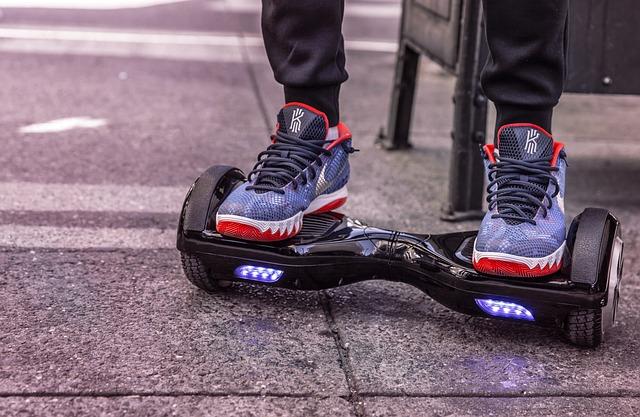
One common issue users encounter with hoverboards is uneven weight distribution, causing the board to shake or vibrate. This can be not only annoying but also potentially dangerous if left unaddressed. In this post, we will delve into the reasons behind this problem and provide troubleshooting tips to help you resolve it.
**Possible Causes of Shaking Hoverboard**
- Uneven weight distribution – if you are putting more weight on one side of the hoverboard
- Low battery level – when the battery is low, the hoverboard may not be able to maintain stability
- Calibration issues – improper calibration can lead to stability problems
- Defective components – faulty sensors or motors can also cause the hoverboard to shake
To address the issue of uneven weight distribution, make sure to distribute your weight evenly on both sides of the hoverboard. Check your posture and adjust accordingly to ensure a balanced stance. Additionally, calibrating your hoverboard regularly can help maintain stability and prevent shaking. If the problem persists, it may be worth checking the battery level and inspecting the components for any defects.
Importance of Regular Maintenance to Prevent Hoverboard Shake
Regular maintenance is crucial in preventing your hoverboard from shaking uncontrollably. When your hoverboard starts to shake, it can not only be annoying but also dangerous. By following a few simple maintenance tips, you can keep your hoverboard in top condition and avoid any vibration issues.
One of the main reasons why hoverboards shake is due to uneven tire pressure. Ensuring that your tires are properly inflated can help stabilize your ride and reduce vibrations. Check the manufacturer’s recommendations for tire pressure and use a pressure gauge to keep them at the correct level.
Another common cause of hoverboard shake is loose components. Regularly inspecting your hoverboard for loose screws, bolts, and other parts can help prevent vibrations. Tighten any loose components as needed to keep your ride smooth and safe.
- Check tire pressure regularly
- Inspect for loose components
- Keep your hoverboard clean
- Consider professional maintenance if needed

How to Calibrate Sensors to Resolve Hoverboard Vibration
In order to resolve the vibration issue on your hoverboard, it is crucial to calibrate the sensors properly. When the sensors are not calibrated correctly, they may misinterpret the rider’s movements, leading to unwanted vibrations. Follow these steps to calibrate your hoverboard sensors:
- Power Off: Start by turning off your hoverboard completely.
- Level Surface: Place your hoverboard on a flat and level surface.
- Calibration Mode: Enter the calibration mode by following the manufacturer’s instructions.
- Follow Instructions: Follow the on-screen instructions to calibrate the sensors.
By properly calibrating the sensors, you can ensure a smoother and more stable ride on your hoverboard. If the vibration issue persists after calibration, it may be a sign of a more serious problem that requires professional assistance.

Expert Tips for Troubleshooting Hoverboard Vibration
One common issue that hoverboard users often encounter is unexpected vibrations while riding. These vibrations can be quite unsettling and, if left unchecked, may even lead to accidents. To help you understand why your hoverboard may be shaking and how to troubleshoot the issue, we’ve compiled a list of expert tips for you to follow.
First and foremost, it’s important to check the tires of your hoverboard. Uneven tire pressure or wear and tear on the tires can often cause vibrations while riding. Make sure that the tires are properly inflated and that there are no visible signs of damage. If necessary, consider replacing the tires to see if that solves the problem.
Another common culprit for hoverboard vibrations is a misaligned axle. A misaligned axle can throw off the balance of the hoverboard, causing it to shake while in use. To correct this issue, carefully inspect the axle of your hoverboard and make adjustments as needed. If you’re unsure how to do this yourself, it’s best to seek the help of a professional.
In addition to tire pressure and axle alignment, it’s also worth checking the condition of the bearings on your hoverboard. Worn-out or damaged bearings can cause excessive friction, leading to vibrations. Inspect the bearings for any signs of wear and tear, and replace them if necessary. By taking these steps, you can hopefully eliminate the vibration issues plaguing your hoverboard and enjoy a smooth and safe ride.
Understanding the Role of Terrain in Hoverboard Shake
One of the common issues faced by hoverboard users is the shaking or vibrating sensation that occurs while riding. This phenomenon can be attributed to various factors, with the terrain playing a significant role in exacerbating the problem. Understanding how the terrain affects the stability of your hoverboard can help you troubleshoot and minimize vibrations for a smoother ride.
When riding a hoverboard on different terrains, you may notice variations in the level of vibration. Here are some key points to consider:
- Uneven surfaces: Rough or uneven surfaces can cause the hoverboard to shake as it struggles to maintain balance.
- Slopes: Riding on inclines can also lead to vibrations, as the hoverboard exerts more effort to climb the slope.
- Obstacles: Bumps, cracks, or obstacles on the path can disrupt the hoverboard’s stability, resulting in vibrations.
To minimize vibrations caused by terrain, consider the following tips:
- Choose smooth and flat surfaces for riding whenever possible.
- Adjust your speed according to the terrain to maintain balance and stability.
- Practice good posture and weight distribution to help the hoverboard navigate different terrains more effectively.

Consulting a Professional for Severe Hoverboard Vibration Issues
When your hoverboard starts shaking uncontrollably, it can be a frustrating experience. Not only is it unsettling to ride on a vibrating board, but it can also be a safety hazard. If you are experiencing severe hoverboard vibration issues, it may be time to consult a professional to diagnose and fix the problem.
There are several reasons why your hoverboard may be shaking excessively. From unbalanced wheels to a faulty motor, pinpointing the root cause of the vibration is crucial in order to effectively address the issue. A professional technician will be able to thoroughly inspect your hoverboard and determine the source of the problem.
Some common reasons for severe hoverboard vibration issues include:
- Unbalanced wheels
- Loose or damaged bearings
- Worn out tires
- Motor issues
By seeking help from a professional, you can ensure that your hoverboard is properly diagnosed and repaired. Don’t let severe vibration issues ruin your riding experience – reach out to a qualified technician to get to the bottom of the problem and get your hoverboard running smoothly again.
Key Takeaways
In conclusion, understanding why your hoverboard shakes can help you troubleshoot and resolve the issue quickly. By checking for loose components, uneven weight distribution, tire pressure, or battery problems, you can ensure a smoother and safer ride. Remember to regularly inspect and maintain your hoverboard to prevent vibrations and keep enjoying your futuristic ride. So, the next time your hoverboard starts shaking, don’t panic – follow these simple troubleshooting tips to get back on track in no time. Happy hovering!